
Open the DerpMap Generator and choose which DERP relay regions to block or allow.
Use the Mode toggle to switch between:
Block Selected — Check the regions you want to disable. Unchecked regions remain active.
Allow Selected — Check the regions you want to keep. Unchecked regions are disabled.
For a quick US-only configuration, click the USA Only preset. This disables all non-US DERP relays, ensuring your Tailscale traffic only routes through servers in the United States.
You can also check or uncheck entire countries at once using the country-level checkbox.
Once you've made your selections, scroll down to the ACL Policy Snippet section. The JSON is generated in real time as you check and uncheck regions.
Click the Copy JSON button to copy the snippet to your clipboard. The output will look something like this:
"derpMap": {
  "Regions": {
    "3":  null, // Singapore
    "4":  null, // Frankfurt
    "8":  null, // London
    ...
  }
}
Each region set to null is disabled. The comments show which city each region ID corresponds to.
Log in to your Tailscale admin console and navigate to Access Controls. Switch to the JSON editor tab.
Paste the copied JSON snippet into the top-level ACL policy object, typically after the "tagOwners" section or any other existing block.
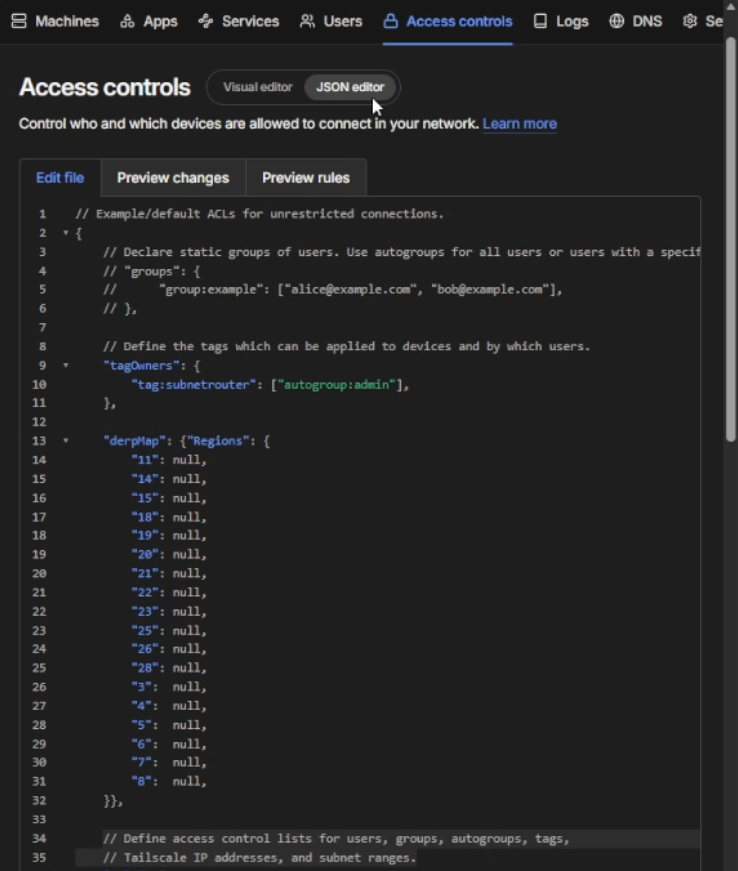
In the screenshot above, you can see the "derpMap" block placed inside the ACL policy. The regions with null values are the ones that have been disabled.
After pasting, click Save at the bottom of the Access Controls page to apply the changes.
tailscale netcheck
After saving your ACL policy, verify the changes took effect by running the following command on any device in your tailnet:
tailscale netcheck
The output will show which DERP relays your device can reach. If you configured US-only, you should only see US cities listed under DERP latency:
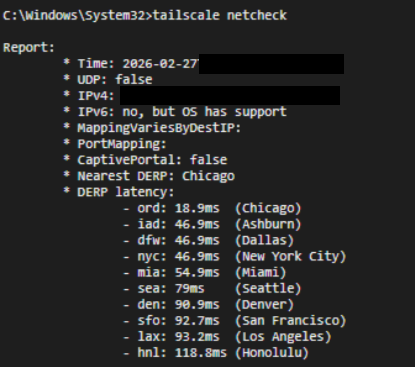
In this example, only US DERP relays appear (Chicago, Ashburn, Dallas, New York City, Miami, Seattle, Denver, San Francisco, Los Angeles, and Honolulu). All international relays have been successfully blocked.
If you still see international DERP relays, wait a minute and try again — it may take a moment for the policy to propagate across your tailnet.